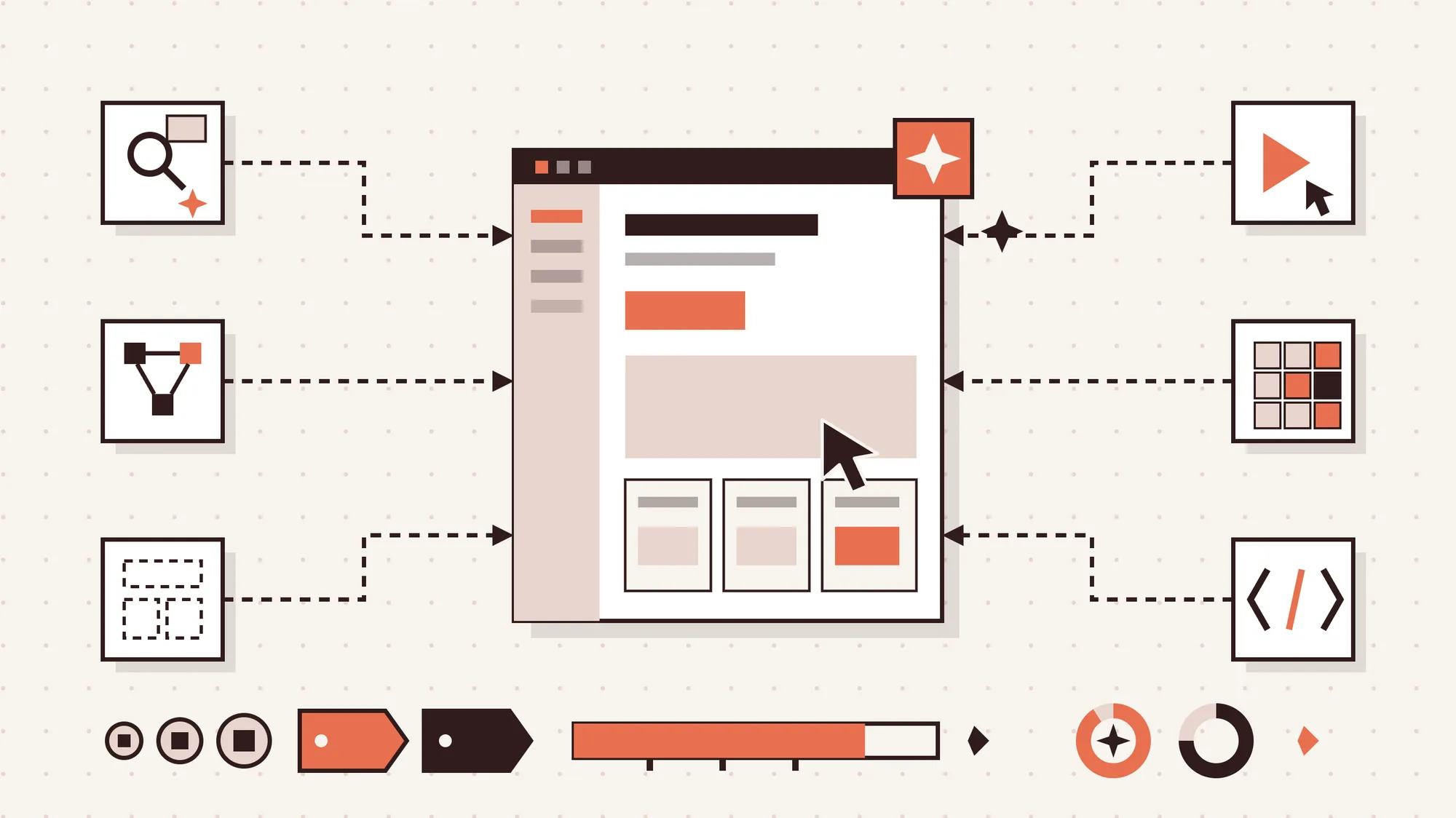
AI for UX and product design means using AI tools to research, design, prototype and test products faster. The designer still sets the strategy and makes the final call. AI now works across the whole design workflow, from interview summaries to developer handoff.
AI in UX design covers research synthesis, personas, microcopy, accessibility checks and predicted heatmaps. AI in product design goes further, with drafted specs, prompt-built prototypes and AI-generated code. In 2026, AI use became near-universal, and designers started acting as product builders.
This guide covers the main tool categories, their costs, and the real benefits and challenges. You'll also get a 7-step workflow and learn how to design AI products people trust. One idea runs through all of it: AI brings speed, but human judgment decides quality.
What Is AI for UX and Product Design?
AI for UX and product design applies generative AI and machine learning to the design process. It helps with research, ideation, prototyping, testing and handoff for digital products.
Designers keep the strategy, empathy and final decisions. So AI works as a companion, not a replacement, and the process stays human-centered.
What Is the Difference Between Designing With AI and Designing for AI?
Designing with AI means using AI tools inside your own design workflow. Designing for AI means shaping the AI features your users interact with.
With AI, you might summarize interviews in Gemini, Chatgpt, Claude or generate layouts in Figma Make. For AI, you design a chatbot or smart search inside a product. Users must understand that feature, trust it and recover when it gets things wrong.
How Does AI Work in the UX and Product Design Process?
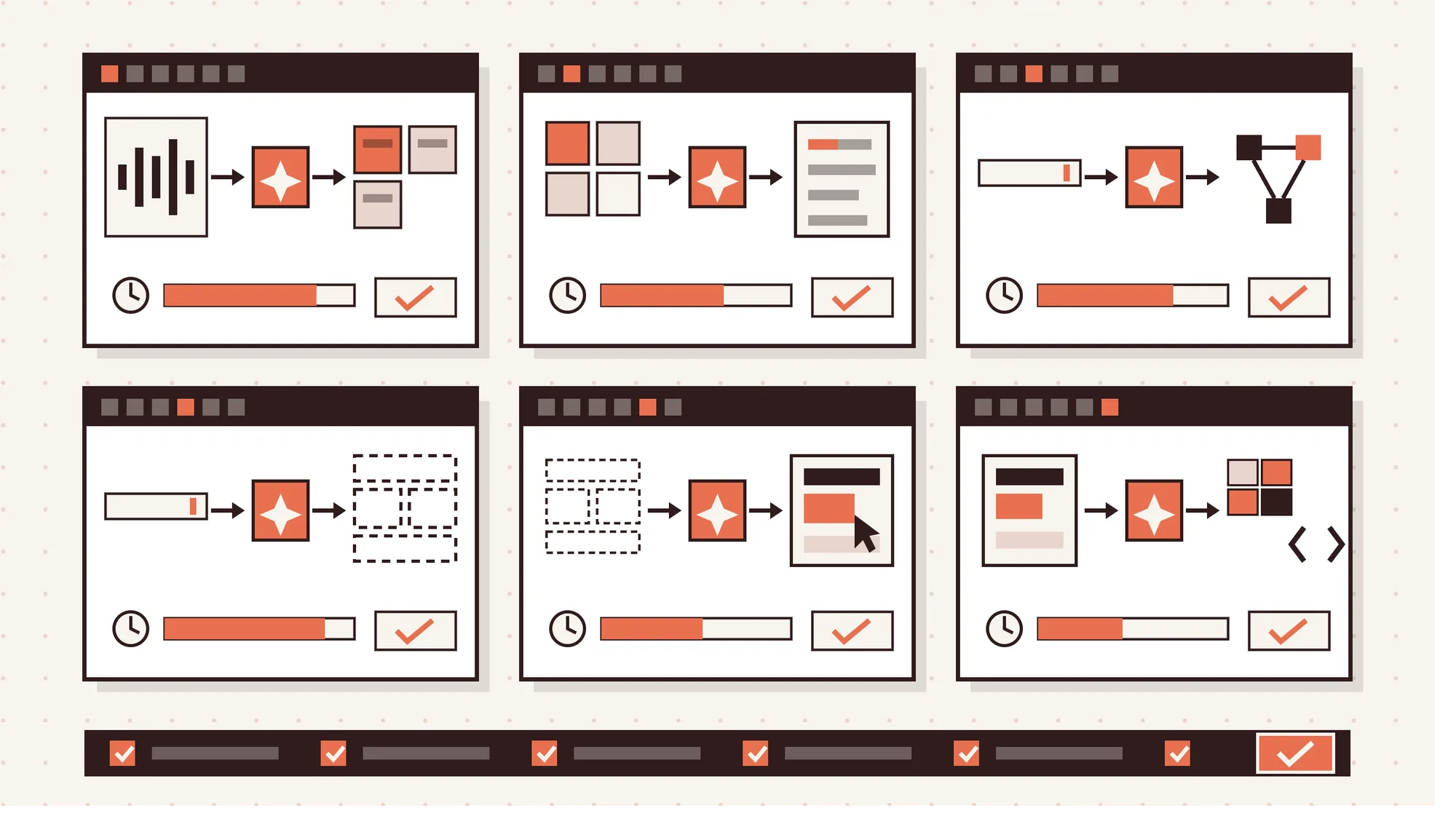
AI works in the UX and product design process by taking on one concrete task at each stage. It speeds up Discover and Define in the Double Diamond, not just the build.
6 stages where AI works in the UX and product design process are given below.
- Research and discovery. AI transcribes interview recordings and summarizes them into key themes. You get a first read in minutes, then check it against raw notes.
- Problem framing and requirements. AI drafts problem statements, user stories and early PRDs from your research. A PRD, or product requirements document, lists what a product must do and why.
- Ideation and user flows. AI maps user flows from a short description of the goal and entry points. Teams compare options before opening a design file.
- Wireframing and UI generation. Prompt-to-UI tools turn a text prompt into wireframes and layout variations. Designers explore fast, then refine the best one by hand.
- Prototyping. Prompt-to-prototype tools build clickable prototypes, and some produce working code. Stakeholders test real interactions instead of reviewing static screens.
- Testing, iteration and handoff. AI predicts attention heatmaps, sorts A/B testing results and writes code for developer handoff. Engineers still review that code before production.
How Is AI Used in UX Design?
AI is used in UX design to speed up research, writing, layout work and quality checks. Research is where adoption started. Maze's 2025 Future of User Research Report found 58% of product professionals used AI in their research.
7 ways AI is used in UX design are outlined below.
- Research synthesis. AI transcribes sessions, groups notes through affinity mapping and runs sentiment analysis. Raw feedback becomes themes you can review the same day.
- User personas and journey maps. AI drafts personas and journey maps from surveys, interview notes and analytics. These drafts give the team a shared starting point.
- UX writing and microcopy. AI writes button labels, error messages, empty states and onboarding copy in several tones. Designers pick the clearest version for the product's voice.
- Wireframes and layout variations. AI generates several layouts for the same screen in seconds. You can compare hierarchy and content order before choosing a direction.
- Accessibility checks. AI flags low color contrast against WCAG standards, missing labels and forgotten error states. Catching these early costs far less than fixing them later.
- Usability testing analysis. AI tags session recordings, pulls out repeated pain points and summarizes task success. Researchers get to insights sooner.
- Predicted attention heatmaps. AI predicts where eyes will land on a screen before any user sees it. Use it for quick hierarchy checks, not as a stand-in for testing. Treat every AI-made persona or theme as a draft. Check it against raw user data first, because AI can invent details that sound right.
How Is AI Used in Product Design?
AI is used in product design to move faster from idea to shipped product. Prototypes and code now replace many long documents.
6 ways AI is used in product design are given below.
- Drafting PRDs and product specs. AI turns meeting notes and research into a first draft of a product spec. PMs and designers then refine scope and edge cases.
- Prototypes in place of written briefs. Many teams now open a project with a working prototype, not a document. The AI in Design 2026 report by Designer Fund and Foundation Capital puts that at 36%.
- Code-backed prototypes and vibe coding. Designers describe a feature in plain language, and AI builds a working version in code. Teams test it with real data before engineering commits time.
- Design system automation with AI agents. AI agents update components, apply design tokens and spot inconsistent styles across files. Large systems stay consistent without manual cleanup.
- Personalized interfaces. Machine learning adapts content, layouts and recommendations to each user's behavior. Designers set the rules, so personalization stays helpful and predictable.
- Experimentation and A/B testing. AI generates variants of headlines, layouts and flows, then reads results faster. Teams can back conversion-focused website design decisions with evidence. The impact is biggest in complex products with many states and user roles. Dashboards, admin panels and onboarding flows in SaaS product design gain the most from faster prototyping.
How Is AI Changing the UX and Product Design Industry?
AI is changing the UX and product design industry by making AI standard and pulling designers toward code. Roles blurred, and judgment became the differentiator.
5 key AI changes in the UX and product design industry are given below.
- Near-universal adoption. The AI in Design 2026 report shows weekly AI use by designers rose from 54% to 91%. The Nielsen Norman Group AI in UX survey 2026 found over 99% of practitioners have generative AI access.
- Designers becoming builders. The AI in Design 2026 report found half of designers have shipped AI-generated code. Figma's 2026 AI report shows designers taking part in development rose from 21% to 41%.
- Blurring roles and titles. In the same AI in Design 2026 data, 20% of designers call themselves design engineers. And 65% now take on more product management or engineering tasks.
- Design tools becoming building platforms. Figma Make left beta and now edits production code through branches and pull requests. Config 2026 added code layers, generative plugins and the Figma agent.
- AI fatigue and a shift to judgment. Nielsen Norman Group's State of UX 2026 calls 2026 the year of AI fatigue. It says UI alone no longer sets products apart, and trust is now a major design problem. Key AI adoption statistics for UX and product designers in 2026 are shown in the table below.
| Statistic | Figure | Source | Year |
|---|---|---|---|
| Designers using AI at least weekly | 91%, up from 54% | AI in Design 2026 | 2026 |
| Designers using AI daily | 75% | AI in Design 2026 | 2026 |
| Designers who shipped AI-generated code | 50%, and 84% at early-stage startups | AI in Design 2026 | 2026 |
| Designers taking part in development | 41%, up from 21% | Figma 2026 AI report | 2026 |
| Developers doing design work | 60%, up from 44% | Figma 2026 AI report | 2026 |
| UX practitioners with generative AI access | Over 99% | NN/g AI in UX survey | 2026 |
What Are the Best AI Tools for UX and Product Design?
The best AI tools for UX and product design fall into 6 categories, one per workflow stage. The AI in Design 2026 report found the average designer uses 7 AI tools, up from 3.
The best AI tools for UX and product design by category are shown in the table below.
| Category | Tools | Best For |
|---|---|---|
| General AI assistants | Claude, ChatGPT, Gemini | Research synthesis, UX copy and specs |
| In-canvas design AI | Figma Make, Figma agent | Prototypes and edits inside design files |
| UI and wireframe generators | UX Pilot, Uizard, Google Stitch, Visily | Fast wireframes and screen variations |
| Code and prototype builders | v0 by Vercel, Lovable, Bolt, Cursor, Claude Code | Working code prototypes |
| Research and testing | Maze, Dovetail, Attention Insight | Testing, analysis and predicted heatmaps |
| Visuals and assets | Midjourney, Adobe Firefly, Khroma | Imagery and color palettes |
Pick tools per workflow stage instead of hunting for one tool that does everything. Also check that each tool respects your design system.
How Much Do AI Design Tools Cost?
Most AI design tools are free to start, and paid seats usually cost $14 to $90 a month. Figma's free Starter plan includes 500 AI credits a month.
Its Full seats cost $16 a month on Professional, $55 on Organization and $90 on Enterprise. Those seats include 3,000, 3,500 and 4,250 monthly AI credits. Figma began enforcing credit limits on March 18, 2026, so heavy prompting can need add-on credits.
Standalone tools often cost less. UX Pilot's paid plans start at roughly $14 to $19 a month. v0 by Vercel has a free tier and a $30 Plus plan.
Prices change often, so check each vendor's pricing page first. Tool fees stay small next to designer time, as our breakdown of UI/UX design cost shows.
What Are the Benefits of AI in UX and Product Design?
The benefits of AI in UX and product design are faster work, better quality and wider exploration. Figma's State of the Designer 2026 survey of 906 designers gives the clearest figures.
The benefits of AI in UX and product design are given below.
- Faster work. 89% of designers say they work faster with AI. Resizing, renaming layers and placeholder copy take minutes instead of hours.
- Better design quality. 91% say AI tools improve their designs. Saved production time goes back into hierarchy, interaction details and polish.
- Wider exploration of ideas. AI produces many concepts in the time one used to take. Teams compare more directions before committing.
- Faster research analysis. Transcripts, surveys and support tickets turn into themes within hours. Insights arrive while they can still shape decisions.
- Better collaboration. 80% of designers say they collaborate better with AI. Shared prototypes give PMs and engineers something concrete to react to.
- Earlier accessibility checks. AI catches contrast issues and missing labels during design. Fixing them before development protects launch timelines.
- Wider skill range. Designers can now prototype in code and build small tools. That range makes them more useful across the product team.
What Are the Challenges of AI in UX and Product Design?
The challenges of AI in UX and product design are unreliable output, privacy risk, bias and generic UI. Each one adds a verification burden that teams need to plan for.
The main challenges of AI in UX and product design are outlined below.
- Unreliable output and hallucinations. Output quality is the top adoption barrier at 54% in the NN/g survey. In the AI in Design 2026 report, 62% of designers call inconsistent output their biggest challenge.
- Data privacy and security. Uploading research to the wrong tool can expose names and sensitive opinions. Privacy is the second most-cited barrier in the NN/g survey.
- Bias toward Western and English-speaking contexts. Many models learn from data skewed toward Western, English-speaking users. Personas and copy can miss other markets' norms.
- Generic, look-alike UI patterns. AI tends to produce the most common layout for any prompt. Products start to look alike, which weakens brand identity.
- Over-reliance and skill atrophy. Leaning on AI for everything can weaken critique, research and visual craft. Junior designers face the biggest risk.
- Ethical and environmental concerns. 34% of UX practitioners in the NN/g survey cite ethics or sustainability concerns. Copyright and energy use raise real questions.
- Tool sprawl and workflow integration. More tools mean more logins, costs and disconnected files. Without a clear stack, work gets lost between tools.
How to Use AI in Your UX and Product Design Workflow?
To use AI in your UX and product design workflow, start small and give AI real context. Keep people in charge of every decision that affects users.
7 steps to use AI in your UX and product design workflow are given below.
- Pick the right tasks first. Start with repetitive, low-risk work like transcription, copy variants and layout options. Keep user interviews and testing with real users human-led.
- Give AI real context. Share raw research notes, your design system and project constraints. Generic input produces generic output.
- Write specific prompts. Name the user, the goal, the constraints and the output format. "List 5 onboarding drop-off risks for first-time banking app users as a table" beats "improve onboarding."
- Ask for evidence. Tell AI to back each theme with quotes from your raw notes. If it can't point to a source, treat the claim as unverified.
- Generate options, then curate. Ask for several directions, then refine the strongest one. Curation is where taste and product knowledge matter most.
- Validate with real users. Test AI-assisted designs with real people before you ship. Predicted heatmaps can guide early choices, but they can't replace actual behavior.
- Set team guardrails. Agree on approved tools, data scrubbing rules and how to document AI-assisted decisions. Clear rules keep quality consistent. We follow the same pattern at Panze. AI speeds up design and code, and senior designers and developers review every output. You can see where that fits in our guide on how white label product design works.
Will AI Replace UX and Product Designers?
No, AI will not replace UX and product designers because it can't understand users or own decisions. People frame problems, set direction and answer for results.
In the NN/g survey, 65% of UX practitioners expect their role to stay important or grow. Only 18% expect it to shrink or be eliminated. NN/g sees surface-level UI work, like assembling design system components, as most exposed.
Our comparison of AI vs human designer strengths covers this question in more depth.
Which UX Tasks Should Not Be Handed to AI?
Most practitioners already keep the human parts human. NN/g found 61% never use AI to interview users, and 51% never use it for user testing.
5 UX tasks that should stay with human designers are given below.
- Interviewing users. Follow-up questions, tone and body language need a real person listening.
- Usability testing with real users. Synthetic users can't show real hesitation and workarounds.
- Final product decisions and trade-offs. Someone accountable must weigh business goals, user needs and technical limits.
- Creative direction and final polish. Brand feel and small details come from trained human taste.
- Ethics and accessibility sign-off. A person must own whether the product is fair, safe and usable.
What Skills Do UX Designers Need to Work With AI?
UX designers need a mix of AI-specific and classic design skills to work well with AI.
6 skills UX designers need to work with AI are outlined below.
- AI literacy. Know what models do well, where they fail and how they handle data.
- Prompting and context setting. Write clear prompts and supply the right files and constraints.
- Critical review of AI output. Spot hallucinations, weak logic and generic patterns early.
- Basic front-end code and prototyping. Read and edit HTML, CSS and simple React in generated prototypes.
- Research and problem framing. Define the right problem, since AI only solves the one you give it.
- Systems thinking for design systems. Structure components and tokens so AI tools use them correctly.
How Do You Design AI-Powered Products?
You design AI-powered products by setting clear expectations, explaining AI output and giving users control. Microsoft's Guidelines for Human-AI Interaction offer a solid base with 18 guidelines.
They're grouped by when they apply: first use, during interaction, when the AI is wrong and over time. NN/g also calls trust a major design problem for AI experiences in 2026.
So add AI only where it solves a real user problem, not because a competitor shipped a chatbot.
What Are AI UX Design Patterns?
AI UX design patterns are reusable interface solutions for common AI interactions like prompting and reviewing output. Examples include guided prompting with suggestion chips, confidence signaling, source citations and human-in-the-loop review.
Each pattern shows users what the AI did and what to do next. Our guide to AI UX design patterns walks through 10 of them for SaaS products.
How Do You Build User Trust in AI Features?
You build user trust in AI features through transparency, user control, consistency and support when the system fails.
5 ways to build user trust in AI features are given below.
- Be clear about what the AI does. Label AI features and state their limits plainly.
- Show sources or reasoning. Link answers to sources so users can check them.
- Give users control. Let people edit, undo or opt out of AI suggestions.
- Keep behavior consistent. Similar inputs should give similar results, or trust fades.
- Help users recover when the AI fails. Offer clear fallbacks, retry options or a path to a human.
Is AI Worth It for UX and Product Design Teams?
Yes, AI is worth it for UX and product design teams because it cuts repetitive, low-value work. The value depends on choosing the right tasks.
NN/g recommends putting saved time into better work rather than more output. Teams that reinvest in research, testing and polish see real gains.
Does AI Make UX Design Faster?
Yes, AI makes UX design faster because it handles desk research, writing, code and data analysis quickly. NN/g survey respondents rated AI time savings 4.2 out of 5, where 3 means no change.
The smallest gains came from interviewing users and testing designs with users. In Figma's own 100-person study, designers and PMs worked 20% faster with Figma Make.
Is It Safe to Use AI With User Research Data?
No, AI is not automatically safe with user research data because some tools keep or train on uploads. Data security or privacy is the second biggest adoption barrier, cited by 50% in NN/g's survey.
Remove personal data from transcripts and use company-approved tools only. Check data retention settings, and get participant consent before processing recordings. Laws like GDPR still apply.
What Are the Pros and Cons of Vibe Coding for Designers?
Vibe coding is building working software by describing it to AI in prompts. It shortens the gap between idea and product, but it adds review and cost overhead.
The pros and cons of vibe coding for designers are given in the table below.
| Pros | Cons |
|---|---|
| Test real interactions and data in prototypes | Output can be inconsistent between prompts |
| Start from a working prototype, not a brief | Generated interfaces often look generic |
| Ship small changes to production yourself | Code still needs engineer review |
| Engineers review changes through pull requests | Heavy prompting burns AI credits |
| Build your own small tools | Leaning on AI can weaken core skills |
What Are the Differences Between AI Approaches in Design?
AI approaches in design differ by what the AI does and which part of design it touches. Generative AI creates and agentic AI acts. The UX and UI split shows where each one helps.
What Is the Difference Between Generative AI and Agentic AI in Design?
Generative AI creates outputs from a prompt, while agentic AI plans and carries out multi-step tasks. Generative AI writes copy, makes images or drafts layouts on request.
Agentic AI edits files, components or code across several steps, like the Figma agent, Chatgpt's Codex or Claude Code. NN/g found 66% of UX practitioners use at least one agentic tool. That makes human oversight more important.
What Is the Difference Between AI in UX Design and AI in UI Design?
AI in UX design improves how a product works, while AI in UI design improves how it looks. UX uses cover user research, user flows and usability testing. UI uses cover visual layouts, components, color palettes and typography.
Both feed the same product, so they work best together. AI is also shaping wider graphic design trends, from generated imagery to new color styles.
Frequently Asked Questions
Is ChatGPT Good for UX Design?
Yes, ChatGPT is good for UX design because it handles drafting, research synthesis and UX copy quickly. Use it for interview questions, persona drafts and microcopy variants.
It isn't built for final UI, so pair it with a design tool. Claude and ChatGPT are among the general assistants designers use most.
Can AI Create User Personas?
Yes, AI can create user personas, but only as a starting draft. AI can invent details that sound believable but aren't true.
Ground every persona in real research data, such as interviews, surveys and analytics. Then validate it with your team and update it as you learn.
Do You Need to Code to Use AI for Product Design?
No, you do not need to code to use AI for product design because tools accept prompts. Figma Make, for example, builds prototypes from plain language without coding.
Basic front-end skills still help. They let you review and edit generated code before it reaches engineers.
Can AI Design a Complete Mobile App on Its Own?
No, AI can't design a complete, launch-ready mobile app on its own. It can generate screens, flows and working prototypes fast.
A real app still needs research, platform guidelines, testing and edge-case design. That's why most teams pair AI tools with experienced designers for mobile app design.
Final Thoughts on AI for UX and Product Design
AI for UX and product design speeds up research, ideation and prototyping. Still, human judgment, real user testing and trust decide whether a product succeeds. The strongest teams use AI for speed and keep people in charge of quality.
That's how we work at Panze, with senior designers behind 250+ delivered projects over 10+ years. If you run an agency, a startup or a SaaS team, explore our AI product design services. We work as an extension of your team, from first prototype to launch.